
 (1) 213-459-3517


1080P IP Camera Outdoor PTZ CCTV Security Wireless IR Camera Night Vision
.jpg?x-oss-process=image/auto-orient,1/quality,q_100/resize,m_mfit,w_1000,h_1000 "1080P IP Camera Outdoor PTZ CCTV Security Wireless IR Camera Night Vision")
.jpg?x-oss-process=image/auto-orient,1/quality,q_100/resize,m_mfit,w_1000,h_1000 "1080P IP Camera Outdoor PTZ CCTV Security Wireless IR Camera Night Vision")
.jpg?x-oss-process=image/auto-orient,1/quality,q_100/resize,m_mfit,w_1000,h_1000 "1080P IP Camera Outdoor PTZ CCTV Security Wireless IR Camera Night Vision")
.jpg?x-oss-process=image/auto-orient,1/quality,q_100/resize,m_mfit,w_1000,h_1000 "1080P IP Camera Outdoor PTZ CCTV Security Wireless IR Camera Night Vision")
.jpg?x-oss-process=image/auto-orient,1/quality,q_100/resize,m_mfit,w_1000,h_1000 "1080P IP Camera Outdoor PTZ CCTV Security Wireless IR Camera Night Vision")
.jpg?x-oss-process=image/auto-orient,1/quality,q_100/resize,m_mfit,w_1000,h_1000 "1080P IP Camera Outdoor PTZ CCTV Security Wireless IR Camera Night Vision")
.jpg?x-oss-process=image/auto-orient,1/quality,q_100/resize,m_mfit,w_1000,h_1000 "1080P IP Camera Outdoor PTZ CCTV Security Wireless IR Camera Night Vision")
.jpg?x-oss-process=image/auto-orient,1/quality,q_100/resize,m_mfit,w_1000,h_1000 "1080P IP Camera Outdoor PTZ CCTV Security Wireless IR Camera Night Vision")
.jpg?x-oss-process=image/auto-orient,1/quality,q_100/resize,m_mfit,w_1000,h_1000 "1080P IP Camera Outdoor PTZ CCTV Security Wireless IR Camera Night Vision")
.jpg?x-oss-process=image/auto-orient,1/quality,q_100/resize,m_mfit,w_1000,h_1000 "1080P IP Camera Outdoor PTZ CCTV Security Wireless IR Camera Night Vision")





Coupon
Combination offer

- 1. PTZ / Preset:
Manually control the PTZ by sliding the steering wheel or sliding the screen on the live preview to control the rotation of the monitor, which will trigger the recording of motion detection. After completing the PTZ control manually, the intelligent tracking will take effect after 3 seconds. After the intelligent tracking is triggered, if there is no moving object within 10 seconds, the monitor will return to the original preset position (the position where the PTZ stays manually). After the monitor triggers the intelligent tracking 10 times, it will automatically adjust once, and then after performing a self-check on the half cycle during the adjustment, it will return to the original preset position.
- 2. Video playback:
Cloud video has color discrimination, dark blue means alarm recording, light blue means no alarm recording. TF card video colors are light blue. Click the Date icon to play the video of the selected date. Click the "X10" icon to adjust the cloud video playback speed, but it does not support TF card playback. By default, video playback is cloud recording. If you want to play video on TF card, you can switch "play video from" to "SD card".
- 3. Video clip:
Drag the playback cursor and click the "Clip" icon, select the start time, then click "Save to Cloud Album", enter the video name, and click "Save". This feature is only available for cameras with a cloud service pack.
- 4. Download / share cloud video:
Click the cloud album icon, then click the video clip, click "Download" to save the video to your phone, or click "Share" to share your video on Facebook and YouTube.
- 5. Cloud video playback: Click Message to view the alert video.
- 6. Alarm sound:
If the alarm sound is turned on, the camera will emit an alarm sound when a moving object is detected. By default, it will last 30 seconds. If it is triggered continuously within 30 seconds, the alarm sound will be prolonged. If the unit supports human animal detection, the alarm sound will be triggered only when human motion is detected.
If the alarm sound is turned off, the alarm sound will not sound even if a moving object is detected.
- 7. Working indicator light:
If the indicator light is turned on, when a moving object is detected, the alarm light will automatically turn on, and the red and blue lights will flash alternately for 60 seconds. If triggered again within 60 seconds, the lighting time will be extended to more than 60 seconds. If the device supports humanoid detection, the warning light will only be triggered when a moving object is detected. If the work indicator is turned off, the warning light will go out even if a moving object is detected.
- 8. Night vision control:
——Turn on night vision: the infrared light is on, the picture is black and compatible for white
——Turn off night vision: infrared light is off, pictures are colorful
——Auto night vision: The infrared light is switched automatically according to the light-sensitive response. The color of the picture also depends on the light-sensitive response.
- 9. Warm light for full-color vision: Warm-light-capable machines have this feature
——Working principle: When the night vision default value is set automatically, the camera will adjust the light intensity according to the ambient light intensity
——Switch control: The default night vision function in the APP is automatic.
——Turn on the night vision device: Forcibly turn on the warm light, and the light intensity reaches the highest level.
——Turn off night vision: Forcibly turn off the warm light, it will no longer turn on at night.
- 10. Compatible for White light control:
——In the compatible for case of automatic night vision, forcibly turning on the compatible for white light, it is bright and the picture is colorful.
——In the compatible for case of automatic night vision, forcibly turning off the compatible for white light, it will go out, and the color of the image depends on the light-sensitive response.
——In the compatible for case of automatic night vision, it will automatically be set to compatible for white light. When the detected object is moved at night, compatible for white light will not be triggered during the day. The compatible for white light will turn on automatically. A trigger will last 60 seconds, and if there is no moving object, it will turn off after 60 seconds. If there are moving objects within 60 seconds, the compatible for white light time will be extended.
- 11. Humanoid detection:
Only devices that support humanoid detection have the function of humanoid detection principles.
——Enable human detection: The camera will trigger human detection when a human or other object (such as a human) is detected and push an alert message to your application.
——Intelligent tracking: When the device with humanoid detection function turns on the intelligent tracking function, it will only follow the shape of the person and not other moving objects.
- 12. Set the TF card recording mode:
Insert the TF card into the card slot and power on the camera. Click "Device Storage" to check. Click "Memory Card Recording Mode" to select the video mode of the TF card.
TF card requirements: storage space 8-128G; C10 TF card; format after use;
- 13. Cloud storage service: Enjoy 30 days of cloud storage service for free, after which you can choose to pay at a lower price.
- 14. Split screen viewing (only available for multiple devices under the same account): Click the Split Screen button to achieve simultaneous preview of multiple devices.
Note: Mostly used for two machines, with split screen function
Packing List:
Monitoring machine (with line) * 1
Adapter * 1
Screw * 1 bag
Screwdriver * 1
Manual * 2
★ 30-day Money Back & one year Replacement Guarantee. Please feel free to contact us if there is any question.
Enter your destination to get a shipping estimate.
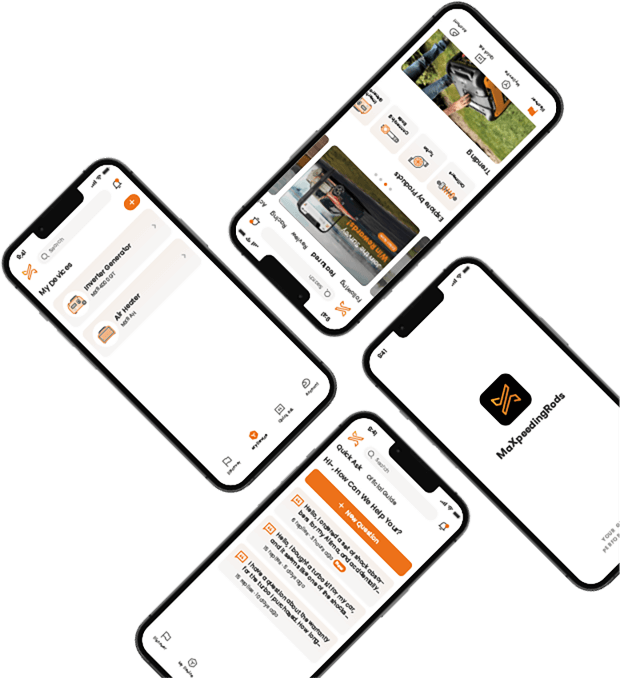
DOWNLOAD MAXPEEDINGRODS OFFICIAL App FOR AN ENHANCED EXPERIENCE:
Search "maxpeedingrods" on Google Play or the Apple App Store for downloads


Official Quick Customer Support
Get timely assistance through our official support channel for a seamless experience
Curated Automotive Content Community
Explore hot car topics, connect with enthusiasts, and share favorites
Smart Control
Conveniently manage home devices remotely, such as air heaters and inverter generators
RELATED PRODUCTS
.jpg?x-oss-process=image/auto-orient,1/quality,q_100/resize,m_mfit,w_350,h_350 "1080P WirelessCCTV Indoor/Outdoor HD IP Camera CAM Security Night Vision")
.jpg?x-oss-process=image/auto-orient,1/quality,q_100/resize,m_mfit,w_350,h_350 "New 1080P Outdoor PTZIP66 Speed Dome Wireless Pan Tilt Security Camera Remote")
.jpg?x-oss-process=image/auto-orient,1/quality,q_100/resize,m_mfit,w_350,h_350 "1080P HD Wireless 5X ZOOM CCTV Outdoor IP Home Security Webcam Camera")
.jpg?x-oss-process=image/auto-orient,1/quality,q_100/resize,m_mfit,w_350,h_350 "Height Adjustable Coilovers compatible for Honda Civic 92-00 EG EJ EH 94-01 Integra DC DB")
.jpg?x-oss-process=image/auto-orient,1/quality,q_100/resize,m_mfit,w_350,h_350 "Maxpeedingrods Coilovers Lowering Kit compatible for BMW 3 Series E36 1991-99 Shocks Struts")
.jpg?x-oss-process=image/auto-orient,1/quality,q_100/resize,m_mfit,w_350,h_350)
.jpg?x-oss-process=image/auto-orient,1/quality,q_100/resize,m_mfit,w_350,h_350)
.jpg?x-oss-process=image/auto-orient,1/quality,q_100/resize,m_mfit,w_350,h_350)
.jpg?x-oss-process=image/auto-orient,1/quality,q_100/resize,m_mfit,w_350,h_350)
.jpg?x-oss-process=image/auto-orient,1/quality,q_100/resize,m_mfit,w_350,h_350)
.jpg?x-oss-process=image/auto-orient,1/quality,q_100/resize,m_mfit,w_350,h_350)
.jpg?x-oss-process=image/auto-orient,1/quality,q_100/resize,m_mfit,w_350,h_350)